This page shows you how to add a Metric Answer.
Metric Answer pages: navigation
To add a Metric answer for a Company requires you to complete three stages which are called:
- Question,
- Source, and
- Answer.
Each stage has several options to select or information boxes to complete.
You can navigate between the stages by clicking on the relevant stage. Your work will be temporarily saved even when navigating away from an incomplete stage.
You can see below how that looks on the interface:

Note: You will have already selected the Company you are researching when you clicked the Research button. Don't hesitate to reach out to us if we can help.
1. Question
- Metric Question: Refers to the information you're looking to find out about a company. To move to the next or previous question, simply click on the arrow buttons (< >).
- Year: The "Year" means the specific year to which the data belongs. Remember, reports usually have information from the last calendar or fiscal year. For example, a "2022" report that gives insights about the company's performance in 2021.
- All metrics: Instead of using the arrow buttons above, you can see a complete list of all Metrics related to this Research Project.
- Select year button: Move to the next stage by clicking the designated button.
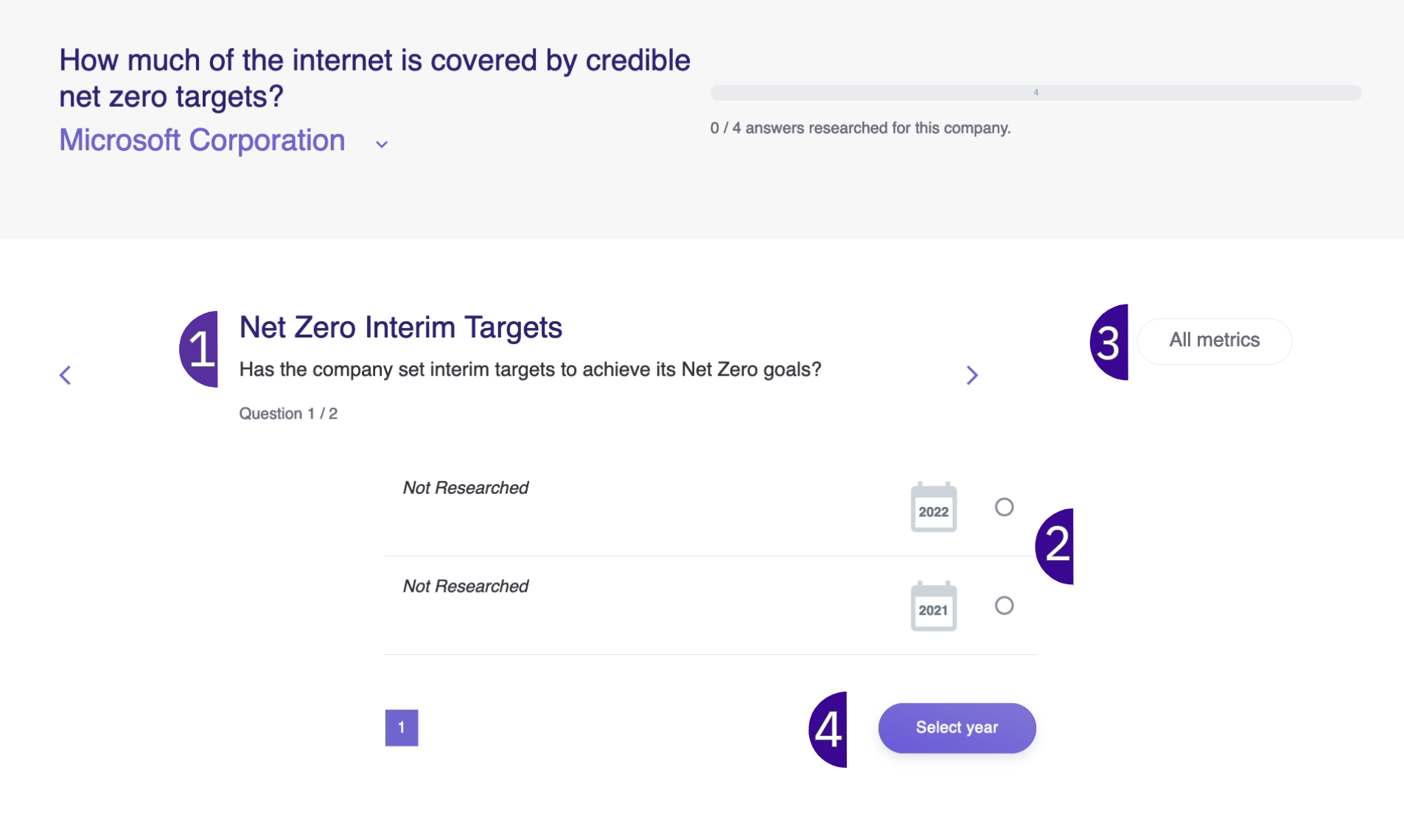
Tip: If you need more information about what the Metric question is asking, read the question and check the Methodology section (at the bottom of the Question page).
2. Source
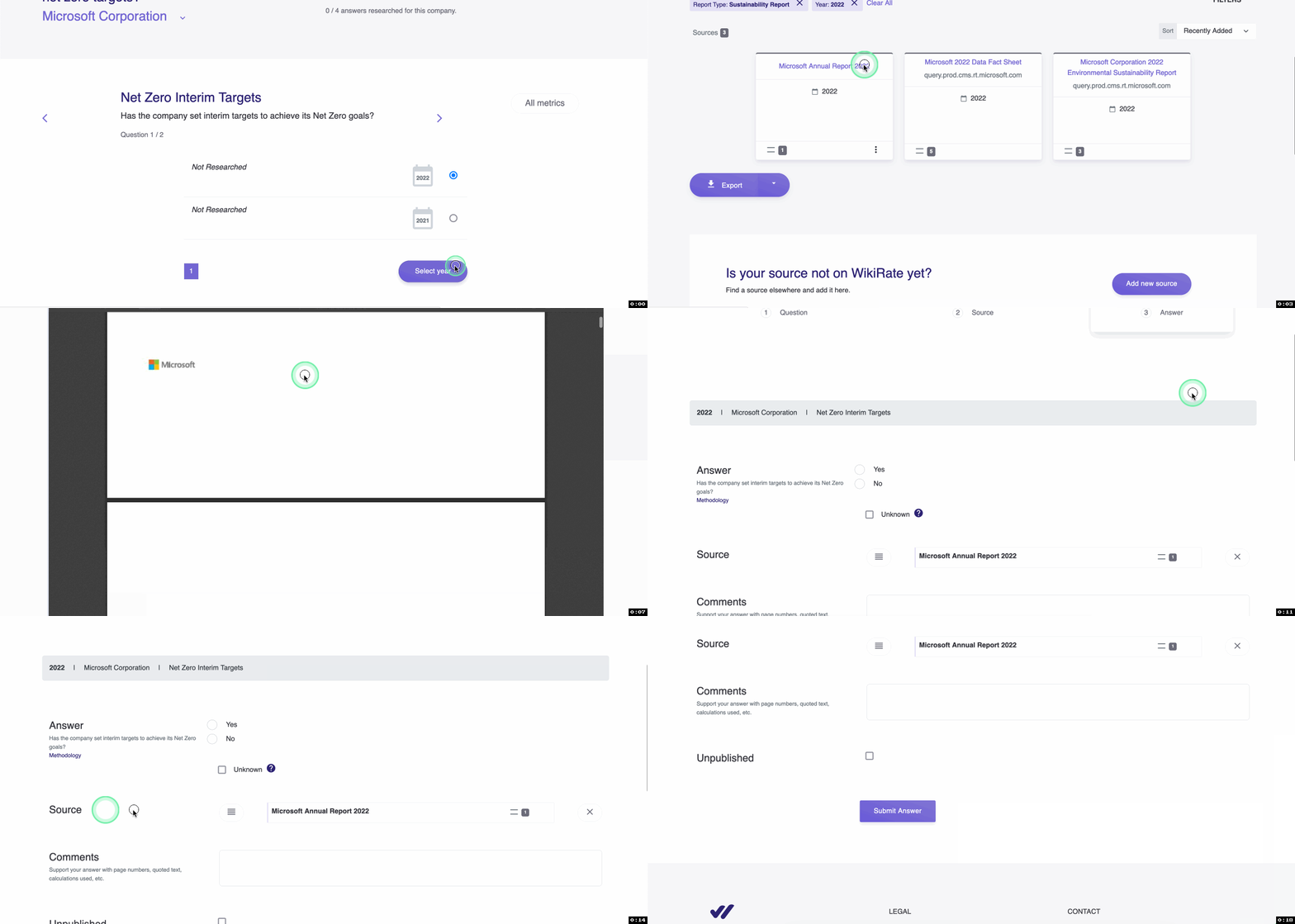
A Source is a report, spreadsheet or webpage that that holds the information required to answer the Question.
Adding a Source to the answer establishes the provenance of the provided value, and ensures the precision and credibility of the answer value.
Numerous sources have already been uploaded onto Wikirate, enabling you to explore the available documents seamlessly within the Wikirate platform.
See below how to open and select a pre-existing source.
2.1 Adding a new Source to Wikirate
With many new Companies’ impacts being researched, new Sources are often needed.
If the Sources page’s filters return no results, you can search the web for a relevant source and add it to Wikirate by using “Add New Source” button.

Clicking the “Add new Source” button will open a dialogue box where you can enter the Source’s details so that it can be stored on Wikirate for other contributors to view and use.
- File: Add the URL of the Source (*only links that end with .PDF). Alternatively, download the report and click on “Add by upload” instead.
- Title: Enter the report title.
- Report Type: From a list of options, indicate whether the Source is a Company Website, Sustainability Report, Annual Report, Mineral Report, Corporate Responsibility Report, Modern Slavery Statement, or an Integrated Report.
- Company: Enter the name of the reporting Company.
- Year: Reporting year
- Description: This field is optional. Add a brief description of the report format, for example, a PDF or Spreadsheet, and any other information others might find useful.
- Submit: Click “Submit” to upload to Wikirate.
2.2. Saving a webpage as a PDF
Some websites include videos, animations, and pop-outs that may interfere with the source creation. If this happens, you can save the website as a PDF file on your computer and upload it as a source. This is how it is done
3. Answer
The value answers the Metric Question; for example, How many tonnes of CO2 does company x produce? The Source that you choose includes the value you enter.
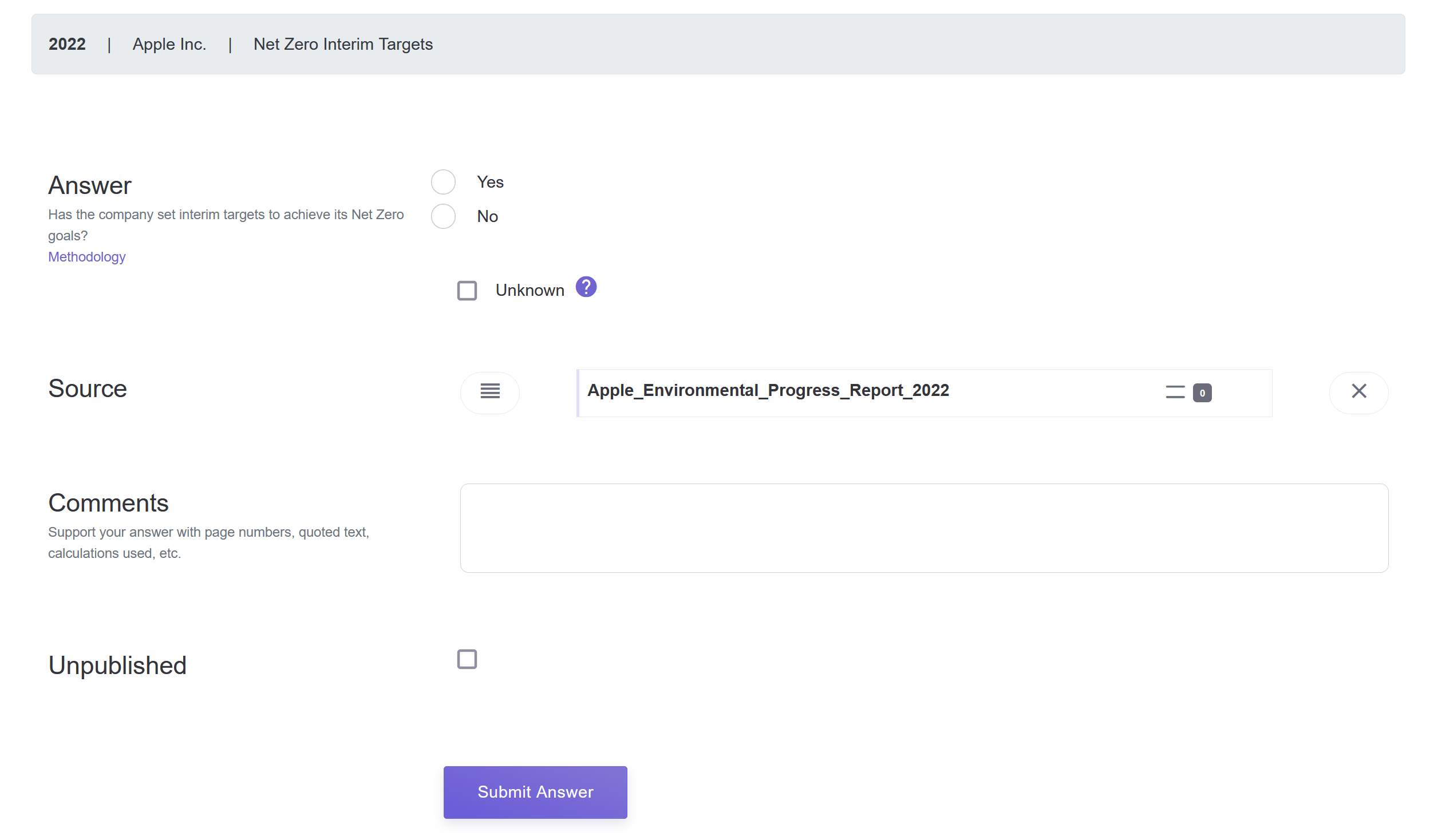
- Value: This is the Response/Value to the Metric Question that you found in the Source on the previous page. If you cannot find the relevant value, select Unknown as your answer option.
- Source: The Source selected on the previous page
- Comments: You can use comments to inform other contributors about your Response Value, for example which page can it be found on, or to quote some text from the source that adds context.
- Submit Answer.
If you are part of a Research Project:
- You will see a Next Question button, click on it to move onto the next Metric Question.
- Continue until you have added all the Metric answers for your Company within the research Project.
3.1 Verify data
If you are part of a university class and are using Wikirate for an assignment, you will be required to peer-review (verify) the research of a fellow student for accuracy.
The process is the same as researching (searching for the correct metric answers in the cited statement), but instead of entering new data, you will verify the data that is already there.
- On the Project Page, find the Company you want to check in the list on the right-hand side.
- Click the Research button to the right of your Company to begin.
- In the Question (Stage 1) select the Year of the answer to verify and click Select Year.
- After selecting the Year, you will be in the Answer page (Stage 3).
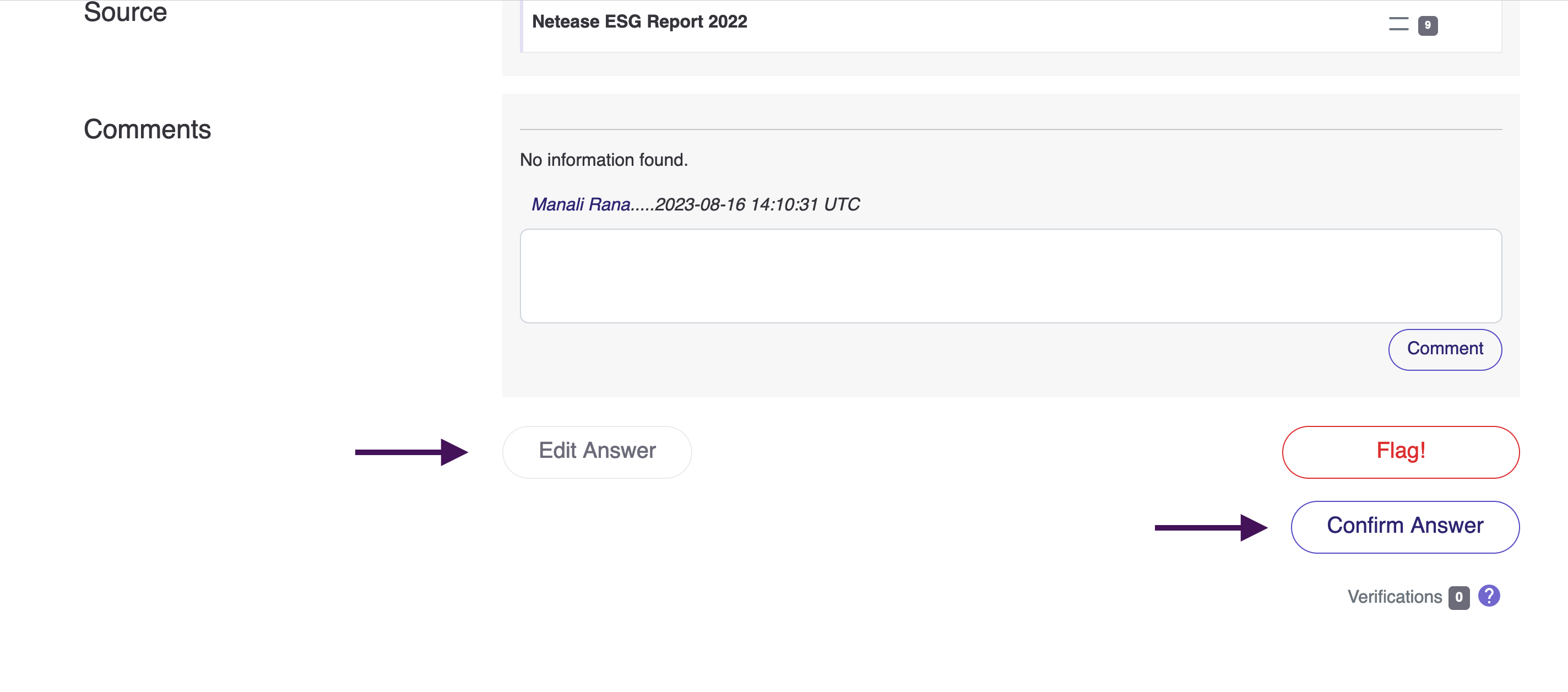
- Next, open the source cited in a new tab, and look for the answer and, if you find the same value as your peer, click the “Confirm Answer” button in the Answer tab.
- Add comments, to show that you found the same answer in the cited report.
- If you find the value is wrong, update it by clicking the “Edit Answer” button. Add Comments to show that you found a different answer in the cited report.
Note: You need to refresh the page to see the updated data.
3.2 Edit an Answer
Feel free to modify answer values and years as needed. If you encounter inaccuracies or discover more suitable answers:
- Navigate to the Question (Stage 1) section and pinpoint the answer value and corresponding Year that necessitate updating.
- Once you've identified the Year, you'll be directed to the Answer tab (Stage 3).
- At the bottom of the page, locate and click the "Edit Answer" button.
- Utilize this feature to rectify the value, source, or Year as required.
- To enhance the process, consider adding a Comment specifying the exact page or section within the document where the incorrect value was located.
- Finalize your revisions and improvements, then proceed by clicking "Submit Answer."
Note: Refreshing the page might be necessary to visualize newly incorporated answers.
3.3 Flag an Answer
Flagged Answers mark dubious data for which an extra review has been requested. Answers are not necesary wrong, but need to be reviewed, verified or edited.To flag an answer, click on the Flag button found next to the Answer.
When you click ‘Flag,’ a dialogue box will appear where you can provide additional details regarding why you are flagging the answer. Options include ‘Wrong Company,’ ‘Wrong Value,’ ‘Wrong Year,’ and ‘Other.’ Regardless of the selection, we kindly request that you provide a comment to inform others about the reason for flagging the answer. If you have any further questions, please don’t hesitate to ask. I will incorporate this information into the Step by Step Guide.
Video Tutorial
Got questions? Need support? Get in touch with us at info [at] wikirate.org